Javascript Event Loop
Learning about the event loop is essential to understanding how asynchronous javascript works, it can help you with writing better, more robust code. Let’s dig in.
Before we get to the event loop, there are a few other concepts we need to learn, let’s start with the call stack.
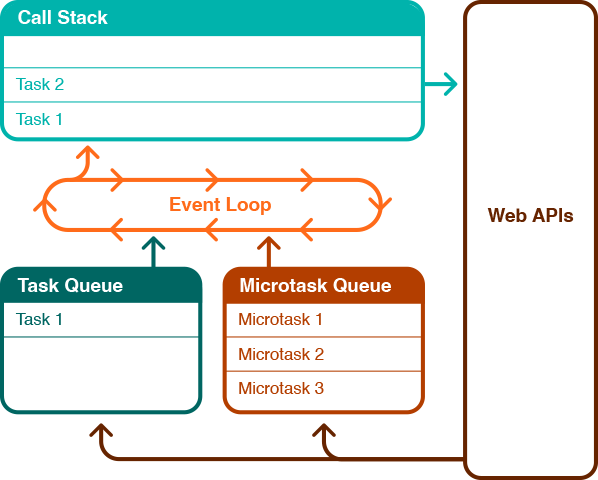
Call Stack
Javascript is single threaded which means only one task can execute at a time, it will complete one task then move onto the next. The call stack is basically a list of tasks to execute. When a javascript function is called, it gets added to the call stack, gets executed and then gets removed from the call stack.
  const myFunc = () => {
    console.log('I like cake');
  }
  myFunc();
Breaking down this example above:
- myFunc is called which gets added to the all stack.
- Each line in the function runs, in this case console.log.
- myFunc is then removed from the call stack.
- Call stack is now empty and ready for the next task.
If there was another function called after myFunc, it wouldn’t get added to the call stack until myFunc is finished and removed.
The reason it is called a stack is because if there are any nested functions within myFunc then they would be added on top of myFunc as a stack. So in the above example, myFunc would get added to the call stack and then console.log would get added on top of that. It then works on the principle of ‘last in, first out’. Therefore, console.log will get executed then removed and then the myFunc is finished so it will also get removed.
  const eatCake = () => {
    addCustard();
    console.log('Stuffs face');
  }
  const addCustard = () => {
    console.log('Pours Custard');
  }
  eatCake();
In the example above:
- eatCake is added to the call stack.
- eatCake calls addCustard which gets added above eatCake.
- addCustard calls console.log which gets added above addCustard.
- console.log executes and gets removed from the call stack.
- addCustard has finished executing so gets removed.
- eatCake then calls console.log(‘Stuffs face’) which gets added above eatCake.
- console.log executes and gets removed from the call stack.
- eatCake is completed and also gets removed.
- Call stack is now empty again and ready for the next task.
Both of the above are examples of synchronous code. If any of the functions called had some heavy computation then the call stack would not continue to the next function until the computation is finished. This would also freeze the app, causing it to be unresponsive. A solution to this unresponsiveness can be found in a previous post on web workers.
Lets see how the call stack functions with async code.
Asynchronous Javascript and Web APIs
When an asynchronous function is called such as setTimeout, this is a Web API and therefore gets registered with the browser to be fulfilled at a later time. This means the function gets removed from the call stack and is no longer blocking the app from continuing. An example:
  const teaAndCake = () => {
    makeTea();
    addCustard();
    console.log('Stuffs face');
  }
  const makeTea = () => {
    console.log('Making Tea');
    setTimeout(() => {
      console.log('Tea ready');
    }, 3000);
  }
  const addCustard = () => {
    console.log('Pours Custard');
  }
teaAndCake();- teaAndCake gets added to call stack.
- teaAndCake calls makeTea which gets added to the call stack.
- makeTea calls console.log(‘Making Tea’) which gets added to the call stack.
- ‘Making Tea’ gets logged then the console.log get removed from the call stack.
- makeTea then calls a setTimeout which gets added to call stack.
- With setTimeout being an asynchronous task and a Web api, the console.log gets registered with the browser to be executed after 3000ms.
- The setTimeout gets removed from the call stack.
- With makeTea now finished, it gets removed from the call stack.
- teaAndCake calls addCustard which gets added above teaAndCake.
- addCustard calls console.log which gets added above addCustard.
- console.log executes and gets removed from the call stack.
- addCustard has finished executing so gets removed.
- teaAndCake then calls console.log(‘Stuffs face’) which gets added above teaAndCake.
- console.log executes and gets removed from the call stack.
- teaAndCake is completed and also gets removed.
- About 3000ms later, console.log(‘Tea ready’) gets added to the now empty call stack.
- ‘Tea ready’ gets logged and gets removed from the call stack.
In step 16, once the 3 seconds of the setTimeout is complete, the registered console.log needs to execute but web apis don’t have access to push to the call stack, instead it pushes it to the task queue.
Task Queue
The task queue holds tasks that come from asynchronous operations such as but not limited to setTimeout and events. Unlike the call stack, the task queue, as the name suggests is a queue and works on a first in, first out principle. If there is already a task in the queue then the next task gets added to the back of the queue.
Now that the console.log is in the task queue it needs to somehow get to the call stack, for any code to be executed it has to first get added to call stack, this is where the event loop comes into play.
Event Loop
The event loop is a mechanism in the javascript engine that checks for tasks to be executed. It first checks the call stack to see if it has any tasks. If it is empty it then checks the micro task queue and the task queue, if there are any tasks waiting then the event loop moves the task to the call stack to be executed.
The microtask queue is similar to the task queue, the difference being it is for promises. So earlier we mentioned that asynchronous tasks from web apis get moved to the task queue when they are ready to be executed, any api that returns a promise gets moved to the micro task queue. This queue takes priority over the task queue. The order of priority goes:
- Synchronous javascript.
- Microtask queue.
- Task queue.
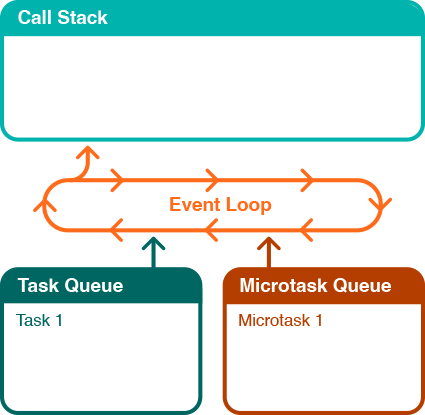
In the diagram above, we have an empty call stack but one task in the microtask queue and one in the task queue.
- The event loop will check the call stack and find it empty.
- It will then check the microtask queue and find a task.
- It then moves the microtask to call stack, it executes and get removed.
- Event loop checks call stack again and finds it empty.
- Event loop checks microtask queue and finds it empty.
- It then checks the task queue and finds a task.
- It moves the task to the call stack to be executed.
Summary
Call stack - a stack of tasks to be run. For any task to execute it needs to be added to the call stack. It works on a first in last out basis.
Task queue - a queue of asynchronous tasks that come from web apis when they are ready to be executed, these include but are not limited to intervals and events. This queue works on a first in first out basis.
Microtask queue - a queue of tasks that are promise based, this queue works in a similar way to the task queue but takes priority over the task queue.
Event loop - a mechanism to check if the call stack is empty, if so then it will check the microtask queue first and move the next microtask to the call stack, once the microtask queue is empty it will them move on to the task queue.